PicsArt vs PhotoRoom: Which Photo Editing App Is Better?
PicsArt vs PhotoRoom is an interesting comparison because both apps are powerful, but they are designed for different types of users. PicsArt focuses on creative photo editing, effects, templates, stickers, and social media content. PhotoRoom is mainly built for product photography, background removal, and business images.
In this guide, we’ll compare PicsArt vs PhotoRoom in simple terms, including features, AI tools, ease of use, pricing, editing options, and the situations where each app works best.
PicsArt vs PhotoRoom: What Is the Difference?
- PicsArt is better for creative photo editing and social media content. It offers more creative tools, effects, stickers, and design options.
- PhotoRoom is better for product photos and professional background removal. It keeps the editing process simple and focuses on clean product images
PicsArt vs PhotoRoom Feature Comparison
|
Feature |
PicsArt |
PhotoRoom |
|---|---|---|
|
Main Purpose |
Photo editing & creative effects |
Product photo editing |
|
Best For |
Creators, photographers, mobile editors |
Beginners, online sellers, businesses, and users who want quick product-photo edits |
|
Photo Editing |
Advanced tools and effects |
Easy editing tools focused on product photos, backgrounds, and quick enhancements |
|
Templates |
Creative templates |
Product, business, advertising, and e-commerce templates |
|
AI Features |
AI effects, AI enhancement, AI replacement |
AI background removal, AI backgrounds, product enhancement, and retouching tools |
|
Layers & Editing |
Advanced layers and masks |
Focuses on quick editing with fewer advanced layer-based controls |
|
Collaboration |
Basic sharing |
Business-focused sharing and workflow features |
|
Platforms |
Android, iOS, Web |
Android, iOS & Web |
|
Export Options |
JPG, PNG, social formats |
High-quality image exports with options focused on product and business use |
What Is PicsArt?
PicsArt is an all-in-one creative editing app that combines photo editing, graphic design, effects, stickers, templates, drawing tools, and other creative features.
Main PicsArt Features
- Photo filters and effects
- Background remover
- Object removal tools
- AI-powered editing features
- Collage maker
- Stickers and overlays
- Text and typography tools
- Drawing tools
- Templates
- Photo retouching
- Video editing
- Creative effects
Who Should Use PicsArt?
- PicsArt is a good choice for:
- Social media creators
- Bloggers
- Students
- Beginners
- Digital artists
- Influencers
- Meme creators
- People who enjoy creative photo editing
What Is PhotoRoom?
PhotoRoom is an editing application focused mainly on product photography and background editing.
Main PhotoRoom Features
- Automatic background removal
- Background replacement
- Product photography tools
- AI-powered image editing
- Product shadows
- Background templates
- Resize and crop tools
- Batch editing
- Marketing templates
- Product-focused designs
Who Should Use PhotoRoom?
If you regularly photograph products for an online store, PhotoRoom can save a lot of editing time. PhotoRoom is especially useful for:
- Online sellers
- Small businesses
- E-commerce stores
- Product photographers
- Social media businesses
- Marketplace sellers
- Marketing teams
Which App Has Better AI Tools?
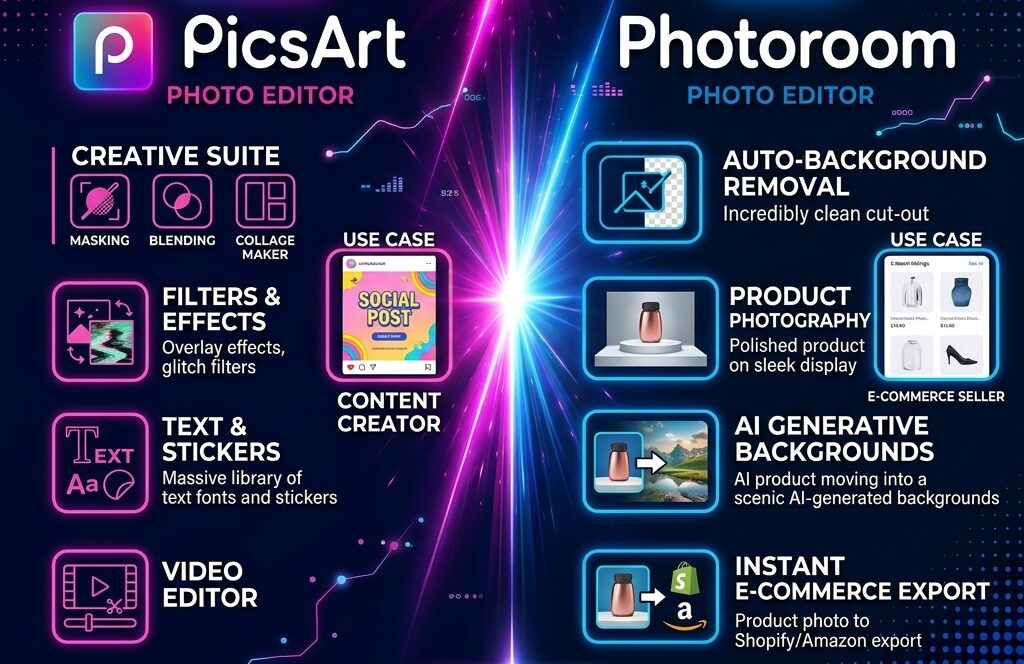
- PicsArt uses AI for creative editing, image generation, effects, enhancement, and other artistic tasks.
- PhotoRoom uses AI heavily for product photography, especially background removal, object isolation, backgrounds, and product presentation.
PicsArt vs PhotoRoom for Background Removal
- PhotoRoom is specifically designed around removing and replacing backgrounds, making it particularly convenient for product photos.
- PicsArt also provides background removal tools, but it gives you more options after removing the background. You can continue editing the subject with effects, stickers, text, filters, and other creative tools.
In this guide you will get detailed information about how to remove a background from PicsArt.
PicsArt vs PhotoRoom for Social Media
PicsArt is best for creating Instagram posts, TikTok visuals, YouTube thumbnails, stories, or creative graphics. You can combine:
- Photos
- Text
- Stickers
- Filters
- Effects
- Backgrounds
- Shapes
- Templates
PhotoRoom can also create social media content, especially business and product-focused designs, but PicsArt offers more creative freedom.
PicsArt vs PhotoRoom for Product Photos
- This is where PhotoRoom has a clear advantage. For example, imagine you sell shoes online. You can photograph the shoes, remove the original background, add a clean background, create a shadow, and prepare the image for your online store.
- PicsArt can also perform many of these tasks, but PhotoRoom is designed specifically around this workflow. When you already have a photo and simply want to improve its appearance before posting.
Which App Is Easier to Use?
Both apps are beginner-friendly, but their interfaces are different.
- PicsArt has many tools, which gives you more possibilities but can initially feel overwhelming.
- PhotoRoom keeps the interface simpler. Its focused approach makes it easier to quickly remove a background and prepare a product image.
PicsArt vs PhotoRoom for E-Commerce
PhotoRoom can be particularly useful for preparing the following:
- Product listings
- Catalog images
- Advertisements
- Social media product posts
- Promotional graphics
PicsArt can still be useful for adding branding, text, creative effects, and promotional elements.
PicsArt vs PhotoRoom Pricing
Both apps offer free features, while some advanced tools require paid plans. The exact price depends on the platform, region, subscription type, and current offers. Therefore, it is better to check the current price inside the official app or website before subscribing.
If you only need basic background removal, a free option may be enough. If you regularly create professional content, a premium plan may provide more useful tools.
What are the pros and cons?
Following are the pros and cons of Picsart:
Pros
Cons
Following are the pros and cons of Photoroom:
Pros
Cons
Which Is Better: PicsArt or PhotoRoom?
|
Choose PicsArt If You Want |
Choose PhotoRoom if you want: |
|---|---|
|
Creative photo editing |
Product photo editing |
|
Artistic effects |
Fast background removal |
|
Filters |
E-commerce images |
|
Stickers |
Clean product backgrounds |
|
Social media designs |
A simple editing workflow |
|
Graphic design tools |
Business graphics |
|
Video editing |
Natural-looking results |
Conclusion
PicsArt is the better all-around option for people who want creative photo editing, social media designs, effects, stickers, templates, and more control over their images. PhotoRoom is the better choice for people who need fast, clean, professional-looking product images, especially for e-commerce and online businesses.
If you’re a content creator or creative editor, start with PicsArt. If you’re an online seller who mainly needs product photos, PhotoRoom is likely the better fit.