PicsArt vs Lightroom (2026): Which Photo Editor Is Best for You?
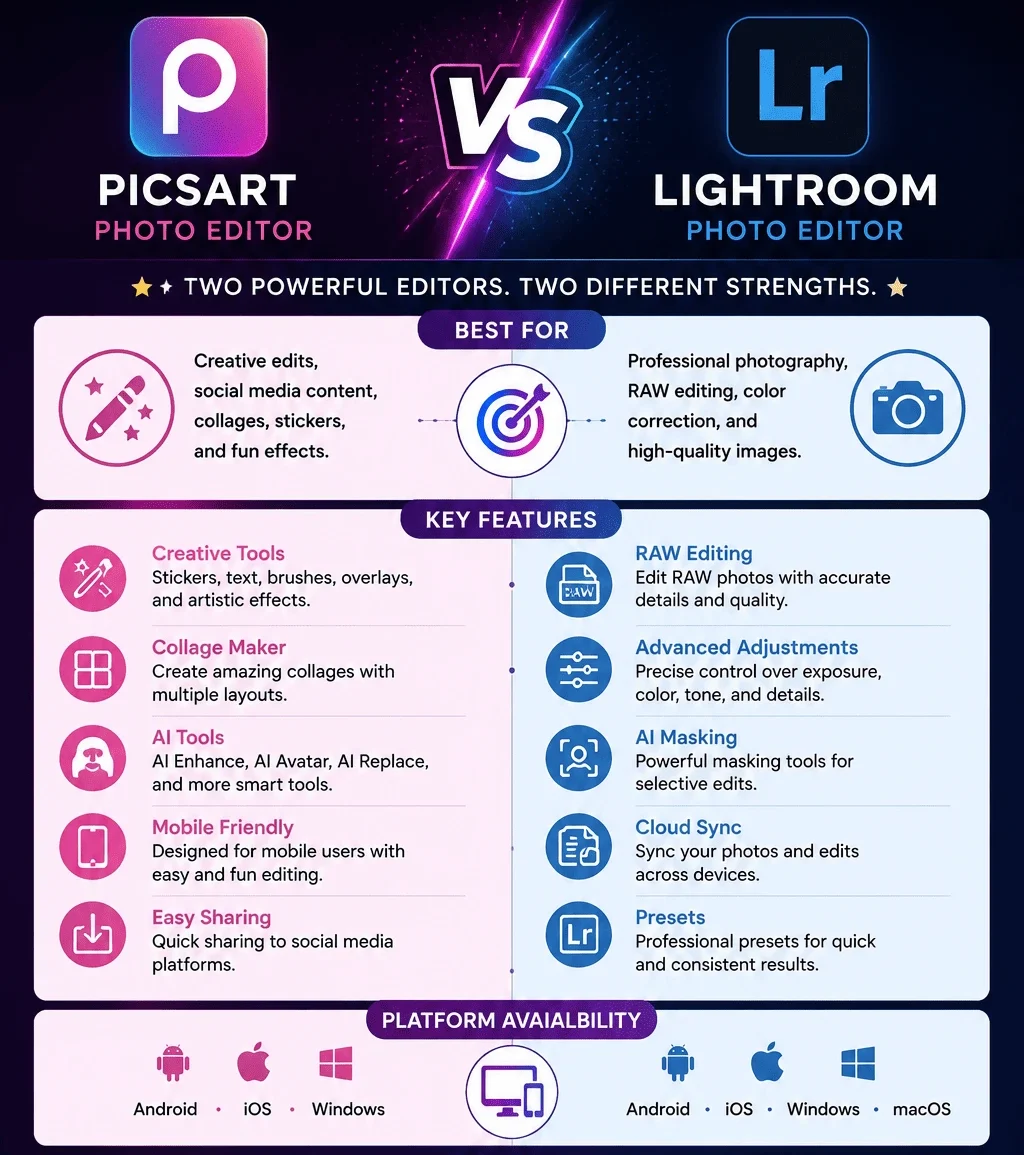
When it comes to photo editing, PicsArt vs Lightroom is an interesting comparison because both apps are powerful but designed for different types of users. PicsArt focuses on creative editing, social media content, templates, effects, and quick edits, while Adobe Lightroom is built more around professional photo correction, RAW editing, color control, and photography workflows.
In this guide, we’ll compare PicsArt vs Lightroom based on features, editing tools, ease of use, AI features, RAW support, video editing, pricing, platforms, and overall performance.
What Is the Difference Between PicsArt and Photoshop Express?
- PicsArt transforms ordinary photos into creative and artistic designs. It offers effects, stickers, templates, collages, drawing tools, text, overlays, and creative AI features.
- Photoshop Express is more focused on improving existing photos. It provides quick adjustments for exposure, color, sharpness, blemishes, perspective, and other common photo problems.
PicsArt vs Lightroom: Quick Comparison
|
Feature |
PicsArt |
Lightroom |
|---|---|---|
|
Main Purpose |
Photo editing & creative effects |
Professional photo editing |
|
Best For |
Creators, photographers, mobile editors |
Photography and professional editing |
|
Photo Editing |
Advanced tools and effects |
Easy editing tools and photo enhancements |
|
Templates |
Creative templates |
Limited templates |
|
AI Features |
AI effects, AI enhancement, AI replacement |
AI masking and photo adjustments |
|
Layers & Editing |
Advanced layers and masks |
Advanced RAW support |
|
Ease of Use |
Very easy |
Moderate |
|
Platforms |
Android, iOS, Web |
Android, iOS, Windows, macOS, Web |
|
Batch Editing |
Available for some workflows |
Strong batch editing workflow |
What Is PicsArt Best For?
PicsArt is an all-in-one creative editing platform designed for users who want to create attractive images quickly. It combines photo editing, graphic design, templates, stickers, filters, text tools, and AI-powered features in one interface.
What are the main strengths of PicsArt?
Who should choose PicsArt?
PicsArt is a good choice for:
If you want to edit a photo quickly and add text, stickers, effects, or other creative elements, PicsArt is usually easier to use.
What Is Lightroom Best For?
Adobe Lightroom is designed for photographers who need more control over their images. Instead of focusing mainly on creative stickers and templates, Lightroom provides detailed tools for exposure, color, lighting, sharpness, noise, and other aspects of photography.
What are the main strengths of Lightroom?
Who should choose Lightroom?
Lightroom is better suited for:
PicsArt vs Lightroom: Which Is Easier to Use?
- PicsArt is generally easier for beginners because many of its tools are designed for quick visual editing.
- Lightroom is better if you are willing to spend time learning photography and color-editing techniques.
PicsArt vs Lightroom: Which Has Better Editing Tools?
This depends on what type of editing you want to do.
Why choose PicsArt for creative editing?
PicsArt offers tools for:
These tools make PicsArt more suitable for creative designs and social media content.
Why choose Lightroom for professional editing?
Lightroom provides more detailed control over:
For professional photography, Lightroom offers much deeper control.
PicsArt vs Lightroom: Which Is Better for RAW Editing?
- Lightroom provides advanced controls for working with RAW images. You can adjust exposure, highlights, shadows, colors, detail, and other elements while maintaining a professional workflow.
- PicsArt is better suited to creative editing rather than a complete professional RAW workflow.
PicsArt vs Lightroom: Which Has Better AI Features?
Both applications offer AI-powered features, but their purposes are different.
PicsArt uses AI for creative tasks such as:
Lightroom uses AI more heavily for photography workflows, including the following:
PicsArt vs Lightroom: Which Has Better Video Editing?
- PicsArt includes basic video editing features that allow users to create and customize short-form content.
- Lightroom is primarily a photo editing and management application, so it isn’t designed as a full video editing solution.
PicsArt is the better option if video editing is important to you
PicsArt vs Lightroom: Which Has Better Presets and Filters?
- PicsArt focuses on creative effects, trendy filters, artistic styles, and visual effects.
- Lightroom presets are more commonly used to create consistent professional color and lighting styles across multiple photographs.
Both applications provide sharing and export options, but PicsArt is particularly suited to social-media workflows.
- PicsArt users can create content in different layouts and prepare designs for social platforms.
- Photoshop Express is more focused on exporting improved photographs after editing.
PicsArt vs Lightroom: Which Is Better for Batch Editing?
- Photographers often need to edit hundreds of images from the same shoot. Lightroom makes it easier to apply similar adjustments and presets across multiple photos.
- PicsArt is better for individual creative projects where you want to customize each image separately.
If you want the old version, here is the complete guide on PicsArt old versions.
PicsArt vs Lightroom: Which Is More Affordable?
Both apps offer free and paid features, but their pricing structures can change over time and vary by platform.
- PicsArt offers a free version alongside paid plans with additional features and resources.
- Lightroom also offers limited functionality without a paid plan, while full access to its professional features is generally associated with Adobe’s paid plans.
Can You Use PicsArt and Lightroom Together?
You can use Lightroom for professional photo correction and then move the finished image to PicsArt for creative work such as the following:
This combination can work well when you need both professional photo correction and creative design tools.
What are the pros and cons?
Following are the pros and cons of Picsart:
Pros
Cons
Following are the pros and cons of Lightroom:
Pros
Cons
PicsArt vs Photoshop Express: Which One Should You Choose?
|
Choose PicsArt if: |
Choose Photoshop Express If You Want |
|---|---|
|
You are a beginner |
You are a professional photographer |
|
You mainly edit on your phone |
You shoot RAW photos |
|
You create social media content |
You need advanced color control |
|
You want templates and stickers |
You edit large batches of photos |
|
You enjoy creative effects |
You want professional presets |
|
You need text and graphic design tools |
You need detailed exposure adjustments |
|
You want quick and simple editing |
You want a photography-focused workflow |
Conclusion
PicsArt is the better choice for creators who want creative freedom, artistic effects, templates, stickers, AI-powered features, and social-media-ready designs. Photoshop Express is the better choice for users who want fast corrections, natural-looking photos, simple retouching, and a straightforward workflow.
If your priority is creativity, choose PicsArt. If your priority is quick and clean photo enhancement, choose Photoshop Express.